

jyamethyst21 님의 블로그
머신러닝 & 딥러닝 본문
이진 분류
- 주어진 데이터를 두 개의 클래스로 구분하는 문제를 해결하는 과정
- 딥러닝 기반 이진 분류 모델의 구조 예시
• 입력층: 데이터의 특성 수에 따라 노드 수 결정(데이터가 10개면 입력층의 노드 수는 10개)
• 은닉층: fully connected layer 사용, 활성화 함수(relu) 주로 사용, 과적합 방지 위해 dropout layer 추가 가능
• 출력층: 1(이진 분류는 하나의 확률값 출력), 활성화 함수(sigmoid)
- 모델 컴파일
• 손실 함수: binary cross-entropy
• 최적화 함수: adam(또는 sgd)
• 평가지표: 정확도, f1-score, precision, recall
- 모델 훈련: 검증 데이터 사용
- 과적합 방지
• early stopping: 훈련 중 검증 성능이 더 이상 향상되지 않으면 조기에 학습을 멈춤, 과적합을 방지하는데 효과적
• dropout: 학습 중 노드 일부를 무작위로 제외하여 과적합 방법
- 데이터셋
• 훈련 데이터셋: 정의 모델 학습시키는데 사용(입력 데이터와 그에 해당하는 실제 레이블 포함)
• 검증 데이터셋: 훈련 중 모델의 성능을 평가하기 위해 사용되는 데이터셋(훈련 데이터, 테스트 데이터와는 별도로 분리된 데이터)
-> 모델이 훈련 데이터에만 치우치지 않고 새로운데이터에도 잘 작동하는지 평가하며, 과적합 감지하는데 사용됨
• 테스트 데이터셋: 학습이 완료된 후, 모델의 최종 성능을 평가하기 위해 사용되는 데이터셋
from tensorflow.keras.models import Sequential
from tensorflow.keras.layers import Dense, Input
from tensorflow.keras.layers import Dropout
from tensorflow.keras.callbacks import EarlyStopping
from sklearn.model_selection import train_test_split
from sklearn.datasets import make_classification
from sklearn.preprocessing import StandardScaler
from sklearn.metrics import classification_report

import matplotlib.pyplot as plt

X, y = make_classification(n_samples=1000, n_features=20, random_state=42)
# 70 : 15: 15 데이터 분리
X_train, X_temp, y_train, y_temp = train_test_split(X, y, test_size=0.3, random_state=42)

X_val, X_test, y_val, y_test = train_test_split(X_temp, y_temp, test_size=0.5, random_state=42)

scaler = StandardScaler()
X_train = scaler.fit_transform(X_train)
X_val = scaler.transform(X_val)
X_test = scaler.transform(X_test)

model = Sequential([
    Input(shape=(X_train.shape[1], )), # 입력층
    Dense(64, activation='relu'), # 첫번째 은닉층
    Dropout(0.5),
    Dense(32, activation='relu'), # 두번째 은닉층
    Dense(1, activation='sigmoid')]
)

model.compile(
    optimizer = 'adam',
    loss = 'binary_crossentropy',
    metrics = ['accuracy']
)

early_stopping = EarlyStopping(
    monitor = 'val_loss',
    patience = 5,
    restore_best_weights = True
)

history = model.fit(
    X_train, y_train, validation_data = (X_val, y_val),
    epochs = 50, batch_size = 12
)

test_loss, test_acc = model.evaluate(X_test, y_test)
print(test_loss)
print(test_acc)
# 결과:
5/5 ━━━━━━━━━━━━━━━━━━━━ 0s 10ms/step - accuracy: 0.8333 - loss: 0.4887
0.4886913001537323
0.8333333134651184

predictions = model.predict(X_test)
predicted_classes = (predictions > 0.5).astype(int)
print(classification_report(y_test, predicted_classes))
# 결과:
              precision    recall  f1-score   support

           0       0.80      0.81      0.81        64
           1       0.86      0.85      0.85        86

    accuracy                           0.83       150
   macro avg       0.83      0.83      0.83       150
weighted avg       0.83      0.83      0.83       150


plt.plot(history.history['loss'], label ='train_loss')
plt.plot(history.history['val_loss'], label = 'val_loss')
plt.legend()
plt.plot(history.history['accuracy'], label = 'train_acc')
plt.plot(history.history['val_accuracy'], label = 'val_acc')
plt.legend()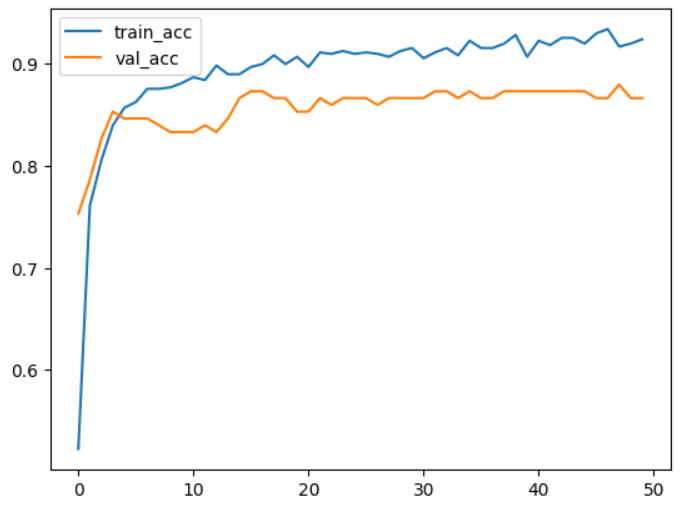
다중 분류 문제 해결 시에는 Softmax 활성화 함수 사용
# 필요한 라이브러리 가져오기
from tensorflow.keras.models import Sequential # 순차적 모델 생성
from tensorflow.keras.layers import Dense # 완전 연결(Dense) 층
from tensorflow.keras.utils import to_categorical # 원-핫 인코딩
from tensorflow.keras.datasets import mnist # MNIST 데이터셋 가져오기
# 1. 데이터 로드 및 전처리
# MNIST 데이터셋을 훈련 세트와 테스트 세트로 분리
(x_train, y_train), (x_test, y_test) = mnist.load_data()
# 입력 데이터(이미지)를 1차원 벡터로 변환하고 정규화 (0~1 범위로 스케일링)
x_train = x_train.reshape(-1, 784) / 255.0 # 28x28 이미지를 784 길이의 벡터로 변환
x_test = x_test.reshape(-1, 784) / 255.0
# 레이블(출력 값)을 원-핫 인코딩 (예: 3 -> [0, 0, 0, 1, 0, 0, 0, 0, 0, 0])
y_train = to_categorical(y_train, num_classes=10)
y_test = to_categorical(y_test, num_classes=10)
# 2. 모델 구성
model = Sequential([
# 첫 번째 은닉층: 뉴런 128개, 활성화 함수 ReLU, 입력 크기는 784
Dense(128, activation='relu', input_shape=(784,)),
# 두 번째 은닉층: 뉴런 64개, 활성화 함수 ReLU
Dense(64, activation='relu'),
# 출력층: 뉴런 10개 (클래스 수), 활성화 함수 Softmax
Dense(10, activation='softmax')
])

# 3. 모델 컴파일
# 손실 함수: Categorical Crossentropy
# 옵티마이저: Adam (효율적인 경사 하강법 알고리즘)
# 평가 지표: 정확도 (accuracy)
model.compile(optimizer='adam', loss='categorical_crossentropy',
metrics=['accuracy'])
# 4. 모델 훈련
# 훈련 데이터(x_train, y_train)로 학습, 검증 데이터로 성능 확인
model.fit(x_train, y_train, epochs=10, batch_size=32, validation_split=0.2)
# 5. 모델 평가
# 테스트 데이터(x_test, y_test)로 모델 성능 평가
test_loss, test_accuracy = model.evaluate(x_test, y_test)
print(f"테스트 정확도: {test_accuracy}")
# 6. 예측
# 테스트 데이터의 첫 번째 샘플을 예측
predictions = model.predict(x_test[:1])
print(f"Softmax 출력: {predictions[0]}") # 각 클래스에 대한 확률 값
print(f"예측 클래스: {predictions.argmax()}") # 확률이 가장 높은 클래스
to_categorical 사용, 원-핫 인코딩도 가능하긴 하다.
# 결과
테스트 정확도: 0.9758999943733215
1/1 ━━━━━━━━━━━━━━━━━━━━ 0s 90ms/step
Softmax 출력: [1.0482707e-08 6.7416522e-10 9.4784873e-09 6.0601377e-07 1.8550610e-16
 5.4682681e-10 1.7426383e-13 9.9999821e-01 9.1434549e-10 1.1554107e-06]
예측 클래스: 7
다양한 딥러닝 대표 모델(역할에 따라)
- 이미지 분류: CNN, ResNet/EfficientNet 계열
• CNN: 대표적인 이미지(공간 패턴) 관련 모델
• ResNet: 층을 깊게 쌓으면 학습이 잘 안됨, 그래서 층을 통과한 결과에 입력을 더해 기본값을 보존한 채로 필요한 변화만 학습
• EfficienNet: CNN에서 성능은 올리되, 계산은 아끼는 구조가 등장하면서 이피션트넷 등장(깊이, 너비, 해상도 중 한쪽만 키우는 것이 아니라 균형 있게 같이 키우자)
- 이미지 분할: U-Net 계열
• U-Net: 이미지의 각 픽셀을 분류해서 영역을 만들음
- 객체 탐지: YOLO / Faster R-CNN 계열
• YOLO: 어디에 무엇이 있는지를 박스+클래스로 예측(실시간에 강함)
- 텍스트/번역/요약: RNN, Transformer
• RNN: 텍스트, 음성 데이터는 앞의 정보가 뒤의 의미에 영향을 주는데 이때 RNN은 이전 상태를 다음 시점으로 넘겨 기억을 흉내냄, 텍스트 관련 대표적인 모델(순서/기억에 강하나 의존과 속도에 한계 존재)
• Transformer: RNN은 초반 정보가 뒤로 전달되기 어려운 등의 문제가 있어 Transformer라는 개선된 모델이 등장, 한 단어씩 순서대로 처리가 아니라 전체를 한 번에 보면서 중요한 관계를 찾음
- 시계열 예측: LSTM/GRU, 또는 Transformer/TCN(Temporal CNN)
- 그래프 데이터(소셜/분자/추천): GNN(그래프 신경망)
joblib, pickle
- joblib: pickle을 기반으로 만든 고성능 저장 도구
- pickle: 파이썬 표준 라이브러리로, 파이썬 객체를 바이트 스트림으로 변환해 저장하고 나중에 다시 원래 객체로 복원해주는 포맷
- 왜 필요한가?
• py, ipynb 같은 파일 형식이 있는데 왜 다른 파일 포맷이 필요한가? 궁금해졌다. py 같은 파일은 코드가 저장되어 있어 전부 실행을 다시 해주어야 하지만 joblib나 pickle은 실행이 완료된 객체 자체를 저장해서 언제든지 실행이 끝난 파일을 그대로 로드할 수 있다고 한다!
- joblib 예시 코드
import joblib
from sklearn.linear_model import LinearRegression
from sklearn.datasets import make_regression

# 샘플 데이터 생성 및 모델 학습
X, y = make_regression(n_samples=100, n_features=1, noise=0.1)
model = LinearRegression()
model.fit(X, y)

# 모델 저장
joblib.dump(model, 'linear_model.pkl')
print("Model saved successfully.")

# 모델 로드
loaded_model = joblib.load('linear_model.pkl')
print("Model loaded successfully.")

# 모델 사용
y_pred = loaded_model.predict(X)
- pickle 예시 코드
import pickle

# 모델 저장
with open('linear_model.pkl', 'wb') as f:
# 파일 열기 모드
– 'wb': 쓰기 모드로 바이너리 형식 저장
– 'ab': 이미 존재하는 파일에 추가 모드로 데이터를 저장

	pickle.dump(model, f)
print("Model saved successfully.")

# 모델 로드
with open('linear_model.pkl', 'rb') as f:
	loaded_model = pickle.load(f)
print("Model loaded successfully.")

# 모델 사용
y_pred = loaded_model.predict(X)
- keras에서는?
from tensorflow.keras.models import Sequential
from tensorflow.keras.layers import Dense
from tensorflow.keras.utils import to_categorical
import numpy as np

# 데이터 생성
np.random.seed(42)
X = np.random.rand(100, 10)
y = np.random.randint(0, 2, 100)
y = to_categorical(y)

# 모델 생성 및 학습
model = Sequential([
Dense(32, activation='relu', input_shape=(10,)),
Dense(2, activation='softmax')
])

model.compile(optimizer='adam', loss='categorical_crossentropy', metrics=['accuracy'])

model.fit(X, y, epochs=5, batch_size=10, verbose=0)

# 모델 저장 (.keras 형식) -> save 사용!
model.save('classification_model.keras')
print("Model saved successfully in .keras format.")

# 로드 시
from tensorflow.keras.models import load_model
import numpy as np

# 모델 로드
loaded_model = load_model('classification_model.keras')
print("Model loaded successfully.")

# 새로운 데이터에 대한 예측
sample_data = np.random.rand(1, 10) # 1개의 샘플 데이터
prediction = loaded_model.predict(sample_data)
print(f"Prediction for {sample_data}: {prediction}")'보안 & IT 지식 🌺' 카테고리의 다른 글
| 머신러닝 & 딥러닝 (0) | 2026.01.20 |
|---|---|
| 머신러닝 & 딥러닝 (0) | 2026.01.19 |
| 머신러닝 & 딥러닝 (1) | 2026.01.16 |
| 머신러닝 & 딥러닝 (0) | 2026.01.14 |
| 머신러닝 & 딥러닝 (0) | 2026.01.13 |